STMicroelectronics STM32H747I-DISCO (stm32h747i_disco)
Overview
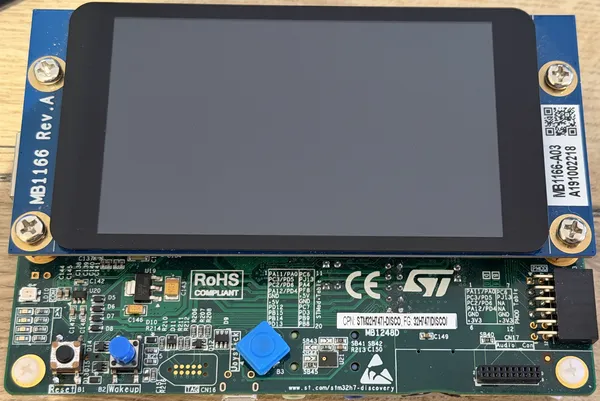
- Board:
stm32h747i_disco/m7,stm32h747i_disco/m4- SoC:
ST STM32H747
- Platform:
none, samples only
The STM32H747I-DISCO is the ST Discovery kit for the dual-core STM32H747.
PebbleOS is built for each core on its own: stm32h747i_disco/m7 runs on the
Cortex-M7, which sets up the clocks and starts the Cortex-M4, and
stm32h747i_disco/m4 on the Cortex-M4. Each core has its own console and its
own system timer.
Hardware
SoC: ST STM32H747XIH6, with an Arm Cortex-M7 with double-precision FPU and 16 KiB L1 caches, and an Arm Cortex-M4 with a single-precision FPU
Memory: 2 MiB embedded flash in two banks of 1 MiB, the Cortex-M7 booting from bank 1 and the Cortex-M4 from bank 2, 512 KiB AXI SRAM, which the Cortex-M7 runs from, and 288 KiB SRAM1 to SRAM3, which the Cortex-M4 runs from
Supply: the SoC SMPS supplies the core domain directly, as the kit ships (
st,supply-config = "direct-smps")Clocks: 25 MHz HSE and 32.768 kHz LSE crystals; PLL1 runs the Cortex-M7 at 400 MHz from HSE, with the AHB at 200 MHz and the APB buses at 100 MHz; the system timers, LPTIM1 for the Cortex-M7 and LPTIM2 for the Cortex-M4, count the LSE
Debug: ST-LINK/V3E on CN2, which also powers the kit, with its virtual COM port on USART1, PA9 (TX) and PA10 (RX), the console of the Cortex-M7
Flashing
The board is flashed with the openocd runner, through the ST-LINK. Give the
serial number of the probe when other debug probes are connected, with
--probe 0483:374e:<serial>, as OpenOCD may pick another one otherwise. The
OpenOCD configuration connects under reset, so the probe reaches the core
whatever the firmware leaves it doing. It also keeps OpenOCD from setting up
the quad-SPI flash, which would leave the flash in a mode PebbleOS does not
expect.
The two cores
Each core is a build of its own, flashed on its own: the Cortex-M7 from bank 1 of the embedded flash, the Cortex-M4 from bank 2.
pbl configure --board stm32h747i_disco/m7 -b build/m7 samples/hello_world
pbl configure --board stm32h747i_disco/m4 -b build/m4 samples/hello_world
pbl -b build/m4 run
pbl -b build/m7 run
The Cortex-M7 sees the Cortex-M4 as a remote processor, the m4 node: once
the clocks are set up, it starts the Cortex-M4 if its boot address, from the
option bytes (bank 2 as the kit ships), holds an image. The Cortex-M4 waits
for it at boot, whether its boot option bit, BCM4, starts it at reset or not,
so the option bytes can stay as they ship.
The consoles run at 1 Mbaud: the Cortex-M7’s on the ST-LINK virtual COM port, the Cortex-M4’s on UART8, D1 (TX) and D0 (RX) of the Arduino connector, for a USB serial adapter.