SiFli SF32LB57x-DPI-HDK (sf32lb57_dpi_hdk)
Overview
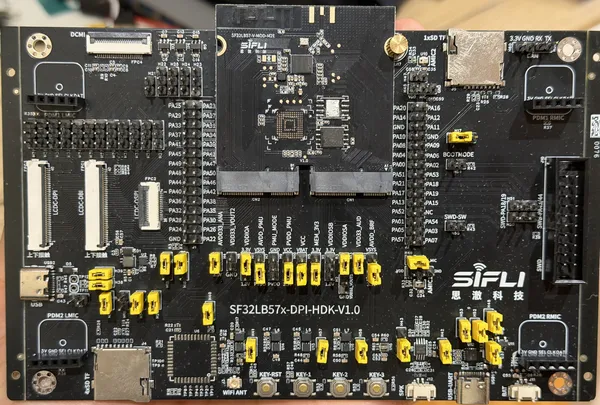
- Board:
sf32lb57_dpi_hdk- SoC:
SiFli SF32LB57
- Platform:
none, samples only
The SF32LB57x-DPI-HDK is the SiFli development kit for the SF32LB57, with the SoC on a plug-in module. PebbleOS supports it with the SF32LB57-V-MOD-M2-E module, which carries an SF32LB579V6EN6, and runs the samples on it: the console, the kernel and its system timer work so far.
Hardware
SoC: SiFli SF32LB579V6EN6, with two Arm STAR-MC1 (Armv8-M) application cores with FPU in the high-performance subsystem, of which PebbleOS runs on the first, a low-power subsystem with its own core and the Bluetooth controller, and 512 KiB SRAM
Flash: 16 MiB Puya PY25Q128HA NOR in the SoC package, on MPI2, which the boot ROM boots from, and another on the module, on MPI3
PSRAM: 16 MiB HyperRAM in the SoC package, on MPI1, supplied by LDO18
Clocks: 48 MHz crystal; the 32.768 kHz crystal is not fitted
Debug UART: PA18 (RX) and PA19 (TX), to a WCH CH343P USB to UART bridge
Flashing
The board is flashed with the sftool runner, over the debug UART, which
needs sftool 0.2.5 or later. sftool attaches through the SoC debugger, which
listens to the receiver of USART1 on PA18 and PA19 while it is on. If sftool
does not connect, as when the firmware has turned that receiver off, turn the
BOOT switch on and press RESET, so that the boot ROM stays in download
mode.
The firmware boots from the flash table at the start of the SoC flash, which replaces the one of the factory firmware.