Pebble 2 Duo (asterix)
Overview
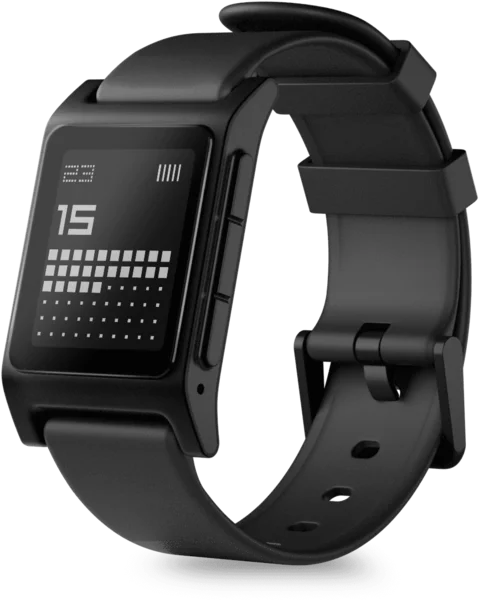
- Board:
asterix- SoC:
Nordic nRF52840
- Platform:
Flint
- Emulator:
qemu_flint
Pebble 2 Duo, announced as Core 2 Duo, is a rectangular black and white watch built around the Nordic nRF52840. Its firmware targets the Flint platform, which apps see as a 144 × 168 black and white display.
Hardware
SoC: Nordic nRF52840, with an Arm Cortex-M4 with FPU, an integrated Bluetooth Low Energy radio, 1 MiB flash and 256 KiB RAM
Flash: GigaDevice GD25LQ255E, 32 MiB NOR
Display: 144 × 168 black and white Sharp LS013B7DH01 memory LCD
Backlight: PWM driven
Accelerometer and gyroscope: ST LSM6DSO
Magnetometer: MEMSIC MMC5603NJ
Pressure: Bosch BMP390 barometric pressure sensor
Ambient light: TI OPT3001
Vibration: TI DRV2604 haptic driver
Microphone: PDM, on the nRF52840 PDM interface
Speaker: Renesas DA7212 audio codec
Power: Nordic nPM1300 PMIC and battery charger
Connecting a programmer
Pebble 2 Duo is programmed with the Core B2B v2, the programmer of its firmware development kit. The mainboard has a B2B (board-to-board) connector, a Molex 5050040812, that gives access to:
MCU VDD, VUSB and GND
MCU SWCLK, SWDIO and RESET
Debug UART RX/TX
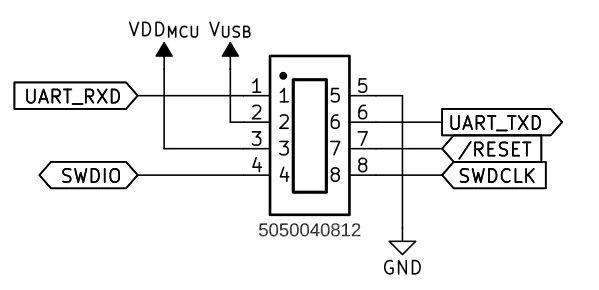
Pebble 2 Duo B2B connector pinout
Plug the Core B2B v2 into the B2B connector as shown below, then connect it to the host over USB:
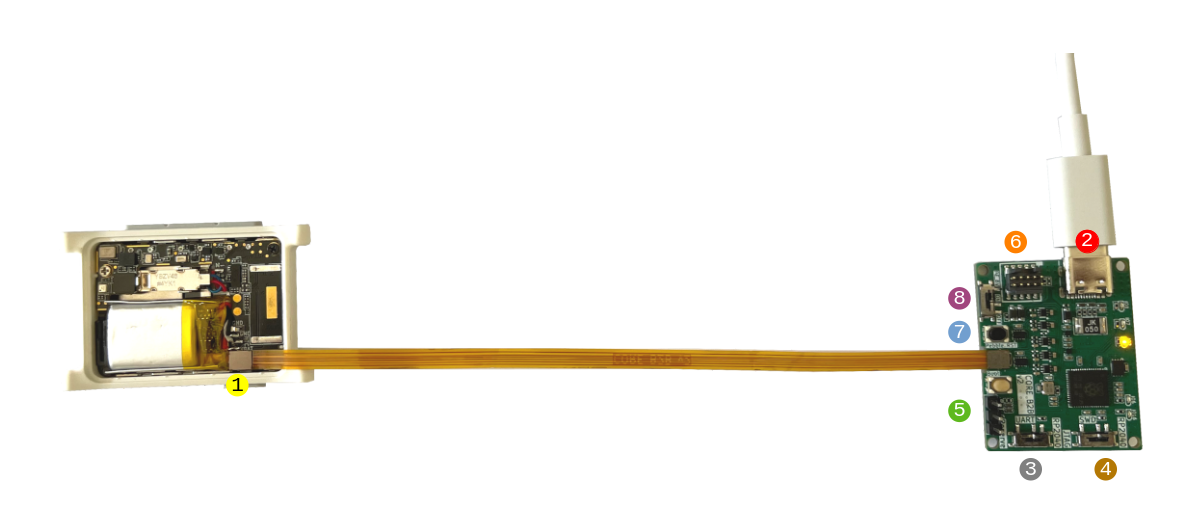
Core B2B v2 connected to a Pebble 2 Duo mainboard
Warning
Connect the programmer in exactly this orientation. Any other orientation renders the watch unusable.
Press the connector until it clicks: when it is not fully seated, the serial console shows output but does not accept input. The programmer’s page explains its switches and firmware updates.
Once connected, the pbl commands flash, debug and reach the console of the watch.