Core B2B v2
The Core B2B v2 is the programmer of the Pebble 2 Duo firmware development kit. It plugs into the watch’s B2B (board-to-board) connector and gives a host SWD debug access and the debug UART over a single USB connection.
- Boards:
- Host interface:
USB: CMSIS-DAP probe and virtual COM port
- Target interfaces:
SWD, debug UART, reset, VUSB
- Runners:
openocd,nrfutil- Firmware:
It is based on the Raspberry Pi Debug Probe.
Features
Core B2B v2
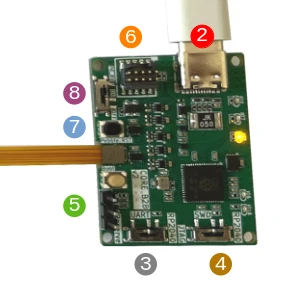
The flex cable on the left goes to the watch’s B2B connector.
USB connector
Powers the board
Provides VUSB
Exposes a CMSIS-DAP device and a virtual COM port
Debug UART routing
L: External connector (5)
R: Embedded virtual COM port (2)
SWD routing
L: External SWD connector (6)
R: Embedded CMSIS-DAP (2)
Debug UART pins
External SWD connector
MCU reset
VUSB switch
L: connected
R: disconnected
Warning
External connectors (SWD/UART) expose 1.8V signals. Do not use any adapter that does not operate at 1.8V, or there is a risk of damage!
Usage
Before first use, update the programmer to the latest firmware release.
To use the built-in CMSIS-DAP probe and USB-UART converter, place switches (3) and (4) to the right. Provide VUSB while programming, so the watch stays programmable regardless of its battery level, by placing switch (8) to the left:
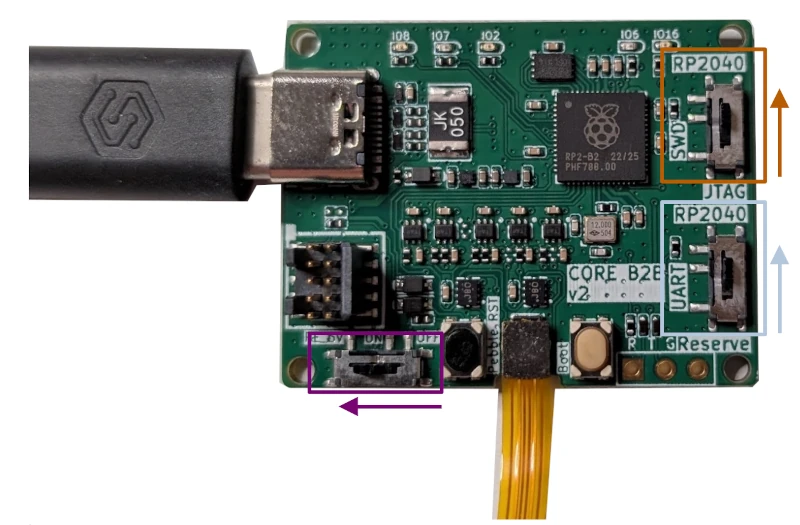
Switches set for the built-in probe and USB-UART converter, with VUSB provided
The board page explains how to connect it: Pebble 2 Duo (asterix).
Troubleshooting
If the watch cannot be programmed, check the switches; they sometimes move during shipping.
If the serial console shows output but does not accept input, the B2B connector is not fully seated. Press it until it clicks.