Service Architecture
Note: The timeline web API is no longer available. The Pebble mobile app does not sync pins from a server. Use local pins instead.
Every item on the timeline is called a 'pin'. A pin can have information attached to it which is used to show it to the user, such as layout, title, start time and actions. When the user is viewing their timeline, they can use the information provided about the immediate past and future to make decisions about how they plan the rest of their day and how to respond to any missed notifications or events.
The system and the Pebble mobile app populate the user's timeline with items such as calendar appointments, missed calls and weather. Apps add their own pins from PebbleKit JS. For example, a sports app could show a pin representing an upcoming match so the user can see how long remains until it starts.
Pins are created on the phone and sent to the watch. There is no server in the path, so no timeline token, API key or appstore listing is needed. The pin format is described in Creating Pins and the PebbleKit JS API in Local Pins.
Architecture Overview
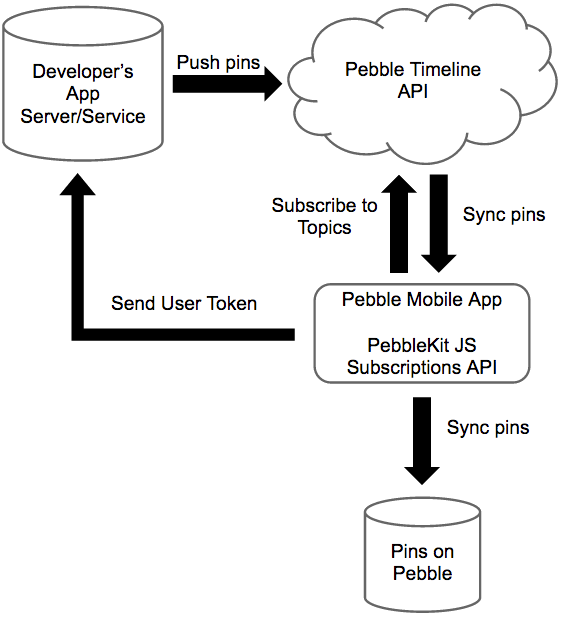
The diagram shows the original timeline service. The 'Pebble Timeline API' cloud service and the developer's server no longer exist; today pins travel only between the phone and the watch.
Watch Timeline
The watch stores the pins and shows them when the user presses Up for the past or Down for the future from the watchface. Alarm pins are inserted directly on the watch. Pins carry their own layout, reminders and actions, so the watch does not need to contact the phone to display them.
Pebble Mobile App
The Pebble mobile app inserts system pins for the user's upcoming calendar events, missed calls and weather, and syncs them to the watch. It also runs the PebbleKit JS component of each installed app and forwards the pins that component inserts.
Sources of Pins
System Pins
Calendar, missed call and weather pins are created by the Pebble mobile app. Alarm pins are created by the watch. Apps cannot change these pins.
Local Pins
Apps insert pins from PebbleKit JS with Pebble.insertTimelinePin() and remove
them with Pebble.deleteTimelinePin(). Each pin is created on the phone that
runs the app's JavaScript, so pins are not shared with the user's other phones
and are only inserted while the app's JavaScript is running. Developers can use
PebbleKit JS to combine the user's preferences from a configuration page
(detailed in App Configuration) with their
location and data from web services to decide which pins to insert.