Visual Studio Code
Visual Studio Code debugs the firmware through the same GDB servers as pbl debug: pbl debugserver starts one, and the Cortex-Debug extension attaches GDB to it. The native simulator is debugged as any host program, with the C/C++ extension.
The configurations below go in .vscode/launch.json in the checkout.
Cortex-Debug needs the SDK’s GDB, the one the build found:
grep PBL_GDB build/CMakeCache.txt
Emulator
Start the emulator and the GDB server in two terminals:
pbl run
pbl debugserver
Then attach from the Run and Debug view:
{
  "version": "0.2.0",
  "configurations": [
    {
      "name": "PebbleOS (emulator)",
      "type": "cortex-debug",
      "request": "attach",
      "servertype": "external",
      "gdbTarget": "localhost:1233",
      "gdbPath": "<PBL_GDB>",
      "executable": "${workspaceFolder}/build/pebbleos.elf",
      "cwd": "${workspaceFolder}"
    }
  ]
}
The Call Stack view lists the kernel’s threads, and breakpoints are set in the editor’s margin:
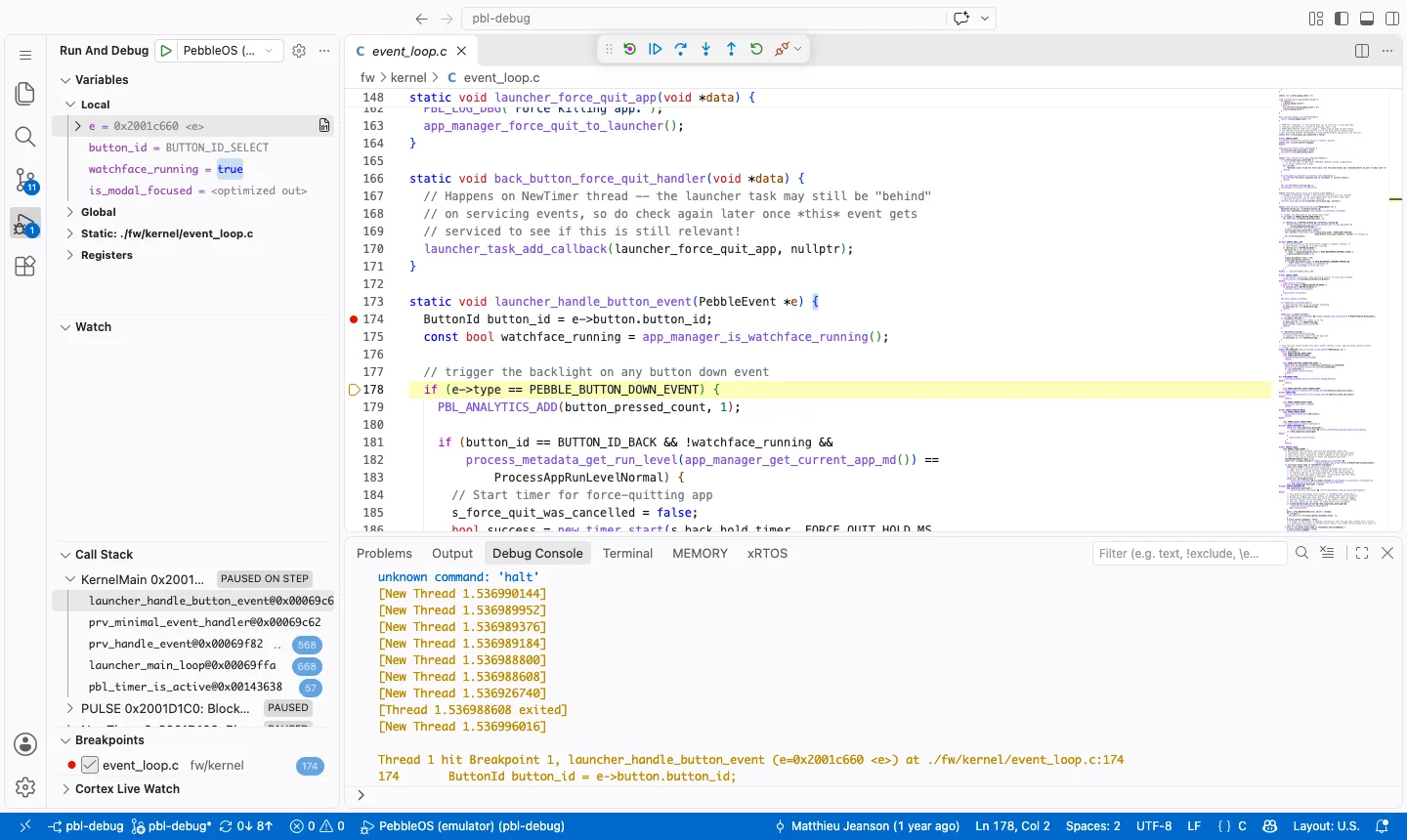
Stopped at a breakpoint, with the locals and the kernel’s threads.
Watch
The same configuration attaches to a watch, with the port of the board’s runner: 3333 for OpenOCD, 1337 for probe-rs. A serial-based debugger also needs the programmer’s port:
pbl debugserver
pbl debugserver --tty /dev/cu.usbmodem5B7A1355001
{
  "name": "PebbleOS (watch)",
  "type": "cortex-debug",
  "request": "attach",
  "servertype": "external",
  "gdbTarget": "localhost:1337",
  "gdbPath": "<PBL_GDB>",
  "executable": "${workspaceFolder}/build/pebbleos.elf",
  "cwd": "${workspaceFolder}",
  "svdFile": "<SVD>"
}
svdFile is optional: an SVD file describes the SoC’s peripherals for the
Peripherals view, e.g. the nRF52840’s in
third_party/hal_nordic/nrfx/mdk/nrf52840.svd.
When the board’s support/probe-rs.yml has gdb-flash, GDB needs that
flash region too, or it patches software breakpoints into flash; e.g. on
the SF32LB52:
"preAttachCommands": [
  "set mem inaccessible-by-default off",
  "mem 0x12000000 0x20000000 ro"
]
Native simulator
{
  "name": "PebbleOS (native)",
  "type": "cppdbg",
  "request": "launch",
  "program": "${workspaceFolder}/build/pebbleos",
  "args": ["-f", "${workspaceFolder}/build/pebbleos-flash.bin", "-c", "12345"],
  "cwd": "${workspaceFolder}",
  "MIMode": "lldb",
  "sourceFileMap": { "${workspaceFolder}/build": "${workspaceFolder}" }
}
Use "MIMode": "gdb" on Linux. -c 12345 moves the console to TCP, where
pbl console attaches. The build names sources relative to the
build directory, which sourceFileMap maps back to the checkout.